



If you’re an Amazon FBA seller in the UK, getting your head around VAT isn’t just good practice—it's a legal requirement. The moment your business hits certain criteria, you're on the hook for calculating VAT on sales, reclaiming it on your business costs (like those endless Amazon fees), and digitally filing a return with HMRC.
Getting this right from day one is absolutely crucial for staying compliant and avoiding some nasty surprises down the line. Most sellers file quarterly, and it all starts with understanding your core obligations.
Before you even think about filing, you need to understand why VAT is such a critical part of your Amazon FBA business. For many UK-based sellers, the main trigger is pretty straightforward: hitting the sales threshold. Once your taxable turnover tops £90,000 in any rolling 12-month period, you have to register. Simple as that.
We've got a detailed guide that breaks down everything you need to know about the UK VAT registration threshold, but there’s a massive catch that trips up countless FBA sellers, especially those operating from outside the UK.
That sales threshold? It’s not the only trigger. In fact, for many FBA sellers, it's not even the most important one.
If you hold even a single item of stock in an Amazon fulfilment centre in the UK, you are legally required to register for VAT. This is a non-negotiable HMRC rule, and your turnover is completely irrelevant. Whether you sell £100 or £100,000, storing goods here means you must register.
For international sellers, this is the most critical point to grasp: storing stock in a UK warehouse makes UK VAT registration compulsory from day one. You don't get the luxury of waiting to hit the turnover limit.
This means any non-UK seller using Amazon's FBA service to store products on UK soil must register for, charge, and pay UK VAT from their very first sale. Understanding this distinction is fundamental to avoiding some very serious penalties.
To summarise the triggers that most often affect Amazon sellers, here’s a quick-glance table.
This table outlines the primary conditions that legally require an Amazon FBA seller to register for VAT in the UK. It's a handy reference to quickly check if your business activities fall under these rules.
Ultimately, for most Amazon FBA sellers, particularly those based abroad, the location of your stock is the rule that matters most. Don't get caught out by focusing only on the turnover threshold.
Once you're registered, you can't just slap a 20% charge on everything and call it a day. You have to apply the correct VAT rate to each of your products, and they can vary quite a bit.
Your product catalogue might include items from a few different categories:
It's entirely your responsibility to classify your products correctly. For instance, if you sell baby clothes (which are zero-rated) alongside matching soft toys (which are standard-rated), you need to account for these different rates accurately in your VAT return.
Finally, remember that Amazon itself charges VAT on all its services—from FBA fees and storage to advertising. The good news is that as a VAT-registered business, you can reclaim this VAT on your return. This is a huge benefit that reduces your overall bill, so make sure you're factoring it in from the get-go to get a true picture of your finances.
An accurate VAT return is only as good as the data you feed it. Before you even think about tackling HMRC’s forms, you need a solid, repeatable system for pulling the right information from your Amazon Seller Central account. This is where most sellers trip up, and it’s a recipe for mistakes and potential penalties down the line.
The absolute cornerstone of this whole process is the Amazon VAT Transactions Report. I can't stress this enough: this single report is your most valuable asset here. It details every sale, refund, and Amazon fee with all the corresponding VAT info you need.
Don’t get it mixed up with your settlement or business reports. Those are brilliant for tracking profitability, but they just don't have the specific VAT details HMRC is looking for.
So, where do you find this golden report? Head to the Reports section in Seller Central, then click on 'Tax Document Library'. In there, you'll find the Amazon VAT Transactions Report. You can generate it for specific periods, which you should always align with your VAT return quarter.
It’s really important to know what you’re looking at. The report breaks down:
A classic pitfall is confusing your gross sales with the net amount that hits your bank account. Your VAT calculation must be based on the total sale price the customer paid, not what’s left after Amazon takes its cut.
Your VAT return isn't just about what you sell. You also need to account for the VAT you can reclaim on your other business expenses – what’s known as input VAT. This is where meticulous record-keeping pays off. It’s time to gather all your invoices and receipts for any business-related purchases.
This covers everything from:
Modern VAT compliance, especially with Making Tax Digital (MTD), is all about digital records. To keep yourself organised and save hours of soul-destroying manual work each quarter, think about leveraging cloud accounting solutions that can automatically pull in and process your financial data.
Before you dive into the return itself, run through a quick checklist. Having a system like this prevents those last-minute panics trying to find a missing document and helps you file with confidence.
Building this data-gathering habit is non-negotiable for any serious Amazon FBA seller. For tailored advice on navigating the unique financial challenges of online retail, explore our specialised services for e-commerce accounting and tax support.

Expanding your Amazon FBA business beyond the UK is a fantastic way to reach a massive new customer base, but it definitely throws a new layer of VAT complexity into the mix. Selling to customers in the European Union isn't the straightforward affair it was pre-Brexit, so getting your head around the new rules is non-negotiable if you want to stay compliant.
The key trigger for EU VAT registration is simple: the moment you start storing stock in an EU country, you have to register for VAT there. This often happens when sellers join Amazon's Pan-European FBA programme.
There's no turnover threshold to wait for here. Holding inventory on foreign soil is what matters. Before you know it, you could be managing VAT registrations in Germany, France, Spain, and Italy all at once.
Amazon's marketplace facilitator rules mean they will often collect and remit VAT on your B2C sales directly to EU customers. It's tempting to think that means they handle everything, but that's a dangerous assumption.
You are still legally responsible for filing accurate VAT returns that correctly report these sales, even if Amazon handled the payment to the tax authorities.
In fact, significant changes in August 2024 reshaped how VAT is collected for UK sellers shipping cross-border. Amazon updated its marketplace VAT mechanism, especially for orders fulfilled from the UK to EU customers. You now need to be absolutely sure the correct VAT rates are being applied based on where your customer lives and be ready for new registration duties if you hold stock in the EU.
Just because Amazon collects the VAT doesn't mean your responsibility ends. You still have to report these sales on your returns and know exactly when a foreign VAT registration is needed. Getting this wrong can lead to serious compliance headaches down the line.
Let's walk through a common scenario for a UK seller using the Pan-European FBA programme. Imagine your products are stored in Amazon warehouses in both Germany and France.
Managing these moving parts demands a clear strategy. As you look to expand your business, you'll find VAT rules are just one piece of the puzzle. For a broader look at the global marketplace, this guide on selling on Amazon internationally is a great resource.
The reality is that dealing with multiple filings and different rules is a lot to handle, which is why many sellers turn to experts. Getting your https://www.gentax.uk/services/vat-returns filed correctly is vital for avoiding penalties and keeping your international operations running smoothly.
Got your data sorted? Great. Now for the actual filing. Since 2022, every VAT-registered business in the UK has been required to follow the Making Tax Digital (MTD) rules. Long gone are the days of manually tapping figures into the government portal; everything is now done through MTD-compatible software that talks directly to HMRC.
The first thing you’ll need to do is authorise your chosen software to communicate with your HMRC digital tax account. Whether you use a platform like Xero, QuickBooks, or a more specialised e-commerce tool, this is a one-time setup. You'll log into your Government Gateway account through the software and grant it permission. Once that handshake is complete, the software can pull your VAT deadlines and push your finished return straight to HMRC.
This is where the magic happens. You’ll need to get your Amazon transaction data into your accounting software. Most platforms have direct integrations, but if not, you can simply upload the CSV files from your Amazon VAT Transactions Report. This step populates the software with all the sales and expense figures, doing most of the heavy lifting for you.
Getting the initial mapping right is absolutely vital. You need to tell the software exactly what’s what:
Nail this setup, and your software will automatically calculate the figures for each of the nine boxes on the VAT return form. It makes the whole process so much smoother.
The workflow below really simplifies how to think about managing your VAT data, from the initial transaction right through to submission.
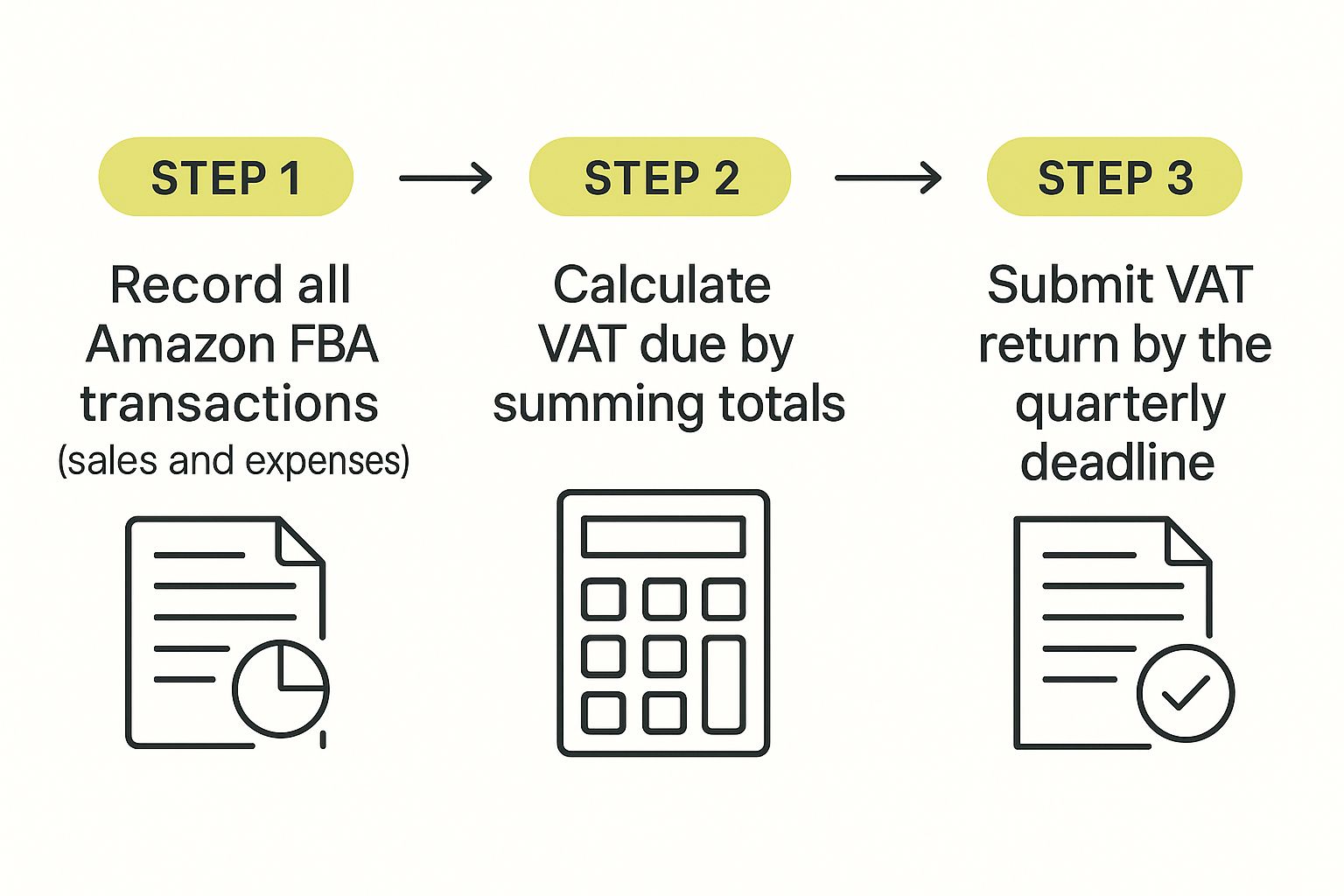
As you can see, a disciplined, step-by-step approach is the key to getting your returns filed on time and without any last-minute panic.
Your MTD software will display the VAT return in a format that mirrors HMRC’s official nine-box form. Although the software does the sums, it's crucial to understand what each box means so you can give it a final check before submitting.
Here’s a quick rundown of the most important ones:
Boxes 6 and 7 show the total value of your sales and purchases (excluding VAT), which helps HMRC double-check the figures in Boxes 1 and 4. Choosing the right software is a huge part of making this easy, and our guide to the best cloud accounting software for startups can point you in the right direction.
Before you hit ‘submit,’ take a moment to sense-check the figures. Does the total VAT due in Box 1 seem reasonable for your sales volume that quarter? Have you accounted for all major expenses in Box 4? A quick review can catch simple mapping errors before they become a problem.
Once submitted through your software, you’ll get a confirmation from HMRC. All that's left is to pay the amount in Box 5 by the deadline, which is usually one month and seven days after the end of your VAT period.
Learning from others' mistakes is far less painful than making them yourself—especially when HMRC is involved. Filing VAT returns for an Amazon FBA business might seem simple on the surface, but a few common slip-ups can easily lead to overpayments, underpayments, and the kind of attention from the taxman that nobody wants.
One of the most frequent errors I see is mishandling customer refunds. When you process a refund, you also need to adjust your VAT records to reclaim the output VAT you originally paid on that sale. If you forget, you're just handing extra cash over to HMRC that you’re entitled to keep.
Another major tripwire is getting the VAT wrong on cross-border sales, particularly for sellers using the Pan-European FBA programme. Different countries have different rules and rates, and trying to apply a one-size-fits-all approach is a recipe for disaster. Both the location of your stock and your customer play a huge role in what you owe, and where.
It’s easy to focus only on the VAT you collect from sales, but reclaiming input VAT is how you actually lower your bill. So many sellers forget to account for the VAT on goods they import into the UK or simply overlook the VAT charged on their various Amazon fees.
You should be meticulously claiming VAT back on:
Failing to reclaim this input VAT is like turning down free money. It has a direct, negative impact on your cash flow and your profit margins.
The single biggest defence against these mistakes is proactive and organised record-keeping. It sounds obvious, but maintaining clean digital records from day one transforms VAT filing from a quarterly nightmare into just another manageable business task.
Finally, a common but costly mistake is trying to do it all yourself for too long. As your FBA business grows—especially if you start selling internationally—your VAT obligations become a whole lot more complex. Realising you need professional help is a strength, not a weakness.
A great habit to get into is setting aside a percentage of your revenue specifically for your VAT bill. It helps prevent nasty cash flow shocks when payment is due. But if your reports start to feel overwhelming or you're expanding into new countries, that's your cue to bring in an e-commerce accountant.
Strong financial management is the bedrock of any scalable business, which is why services focused on professional bookkeeping for online sellers are so valuable. They provide the clarity you need to avoid these common pitfalls and keep your business financially healthy for the long haul.
Diving into the world of VAT often throws up a lot of "what if" scenarios. Let's tackle some of the most common questions we hear from Amazon FBA sellers to clear up any lingering doubts you might have.
This one trips a lot of sellers up. Once you're VAT registered in the UK, the short answer is yes – you are legally required to charge the correct rate of VAT on every sale to a UK customer.
But it’s not always the standard 20%. The rate depends entirely on what you're selling. Most products, like electronics or adult clothing, fall under the standard rate. However, some items have different rules. For instance, children's car seats are reduced-rated at 5%, while things like most food items and children's clothing are zero-rated (0%).
It's your responsibility to get this right. While you can set up Amazon's system to apply these rates, the initial classification of your products is entirely down to you.
Absolutely. This is one of the biggest perks of being VAT registered. You can reclaim the VAT you pay on your business expenses, which is known as input VAT. Getting this right is a huge boost for your cash flow and can significantly cut your final bill to HMRC.
This covers the VAT that Amazon charges on its services, including:
To get that money back, you must have valid VAT invoices from Amazon, which you can download straight from your Seller Central account. Don't leave money on the table – make sure you're reclaiming every penny of eligible input VAT.
HMRC isn't very forgiving when it comes to deadlines and accuracy. They use a penalty point system for late submissions and payments. You get one penalty point for every late VAT return, and once you hit a certain threshold, you'll be hit with a financial penalty. On top of that, late payments rack up interest charges that can snowball quickly.
What if you find a mistake on a return you've already filed? Don't panic, but act fast. If the net error is under £10,000, you can usually just correct it on your next return. For anything larger, you must report it directly to HMRC. Being proactive and honest is always the best approach.
Keeping your VAT affairs in order is non-negotiable for a healthy FBA business. For expert help designed specifically for e-commerce sellers, GenTax Accountants can ensure you stay compliant and financially efficient. See how we can support you at https://www.gentax.uk.
